Day: August 10, 2026

BTT Roster Preferences

Hi All

Friendly reminder to share your preferences for BTT with Zhang Bo and I.

Please complete this two-question form to indicate your BTT preferences. Whilst we cannot guarantee all these preferences, it will help us to create as equitable a roster as possible. 

As always, feel free to come and chat if you have any questions.

Have a great day!

Accounts Office Service & Reimbursement Arrangements

As we begin the new school year, the Accounts Office would like to share a few reminders to help streamline reimbursement, payment processing and finance support services.

Please note the following arrangements:

  • Cashier’s Window: To better align our services with current demand, the cashier’s window will generally operate twice a week, on Monday and Thursday, from 8:00–11:30 and 12:30–16:00.
  • Finance Enquiries: Please email Julia Zhang for credit card payment requests, WeChat Pay support and other finance-related enquiries. Requests and walk-in consultations will normally be handled on Wednesday afternoons, unless the matter is urgent.
  • Staff Reimbursements: Reimbursements will normally be paid once a month by bank transfer, on the last Thursday of each month, separately from payroll.
  • Urgent Cash Reimbursements: Cash reimbursements are available only for special cases (e.g. student trips or activities). Please enter “Cash to [Recipient Name]” in the Payee’s Info or Bank Info field on the E-form.
  • Submission of Approved E-forms: To ensure reimbursements can be processed on time, please submit the printed and approved E-form, together with all supporting documents, e.g. FA PIAO or Invoice, to the Accounts Office in advance of the monthly payment run.

Thank you for your understanding and cooperation as we continue to provide timely and efficient finance services.

Community Sports – We Need You!

Would you or your spouse be interested in leading a Community Sport? Please contact Anna Y to learn how easy it is! We are looking for parents or teachers to help organize community sports activities in the evenings on weeknights from 6:30–8:30 PM or on Saturdays. Community sports are open to NIS students G9 and above, parents, teachers and non-NIS adults. Last year, we were able to offer:

  • Community Football
  • Community Basketball
  • Community Volleyball
  • Community Badminton
  • Community Pickleball

Exclusively for our NIS families we offered:

  • NIFC Football K1 and up
  • Family Badminton G4 and up + parent
  • Family Athletics G3 and up + parent

If you would like to organise a Community Sport or an activity that is not a sport, please contact Anna Y in the Activities Office.
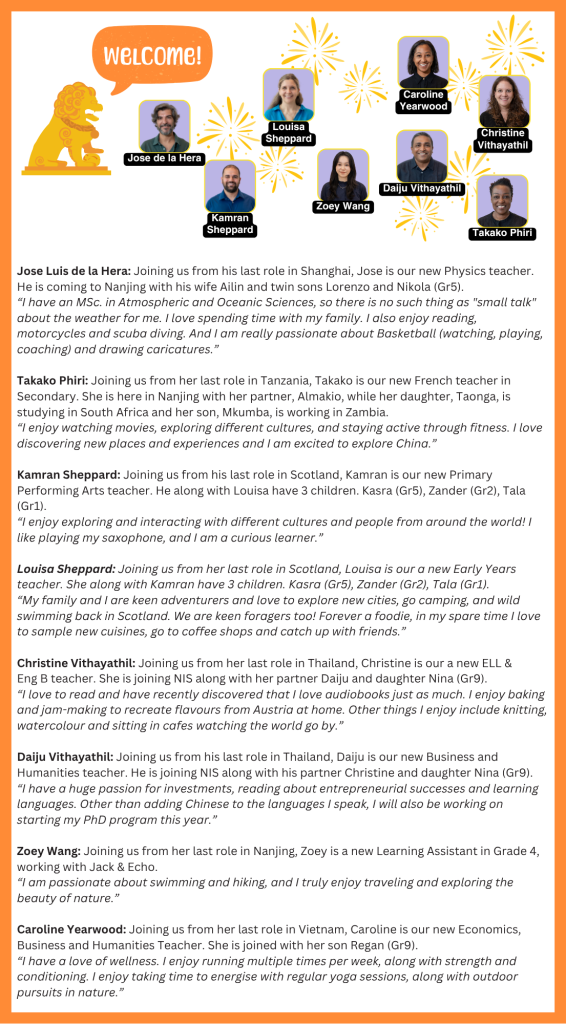
New Staff Introductions

We would like to introduce and welcome our new NIS teachers. They bring a wealth of experiences and knowledge and we’re so glad that they will be joining our NIS community.

Chess Boards and other Activities Material

While you’re tidying up your teaching spaces and offices, please keep an eye out for any Chess Boards and tubs of Lego that didn’t make it back to the Activities Office last June. Please drop me email to collect the items or you can bring them to the Activities Office or to my NEW classroom D207 (old PYP ELL office/MYP LGR). Thank you in advance.

And if for any reason, you need paper bags (lunch size), paper coffee cups, or knitting needles or other completely random things, please ask. We have treasures up in our storage room.

Epic School Plus – online reading resource

Epic School Plus is our paid offering for schools and districts. It gives educators and students unlimited, 24/7 access to over 40,000 e-books, learning videos, read-to-me, decodables, graphic novels, quizzes and curated collections in English. We have thousands of titles in Spanish, Mandarin, French and Gaelic. The content is ideal for students age 12 and under.

Before school starts: Log in to Epic School Plus (set up new account if never used before); Archive last year’s class (don’t delete); transfer previous students to current teacher (move students up a grade); Create class; Add students NEW to NIS to your class; copy class code – post in classroom & SeeSaw

Epic Teacher Resources (how-to videos, flyers for students & parents, reading motivation, book collections, and more)

How to add students to your roster (YouTube video)

Transfer existing student profiles to a new teacher (last year’s teacher should do this once class lists have been created)

How to create collections of books and assign to students (whole class or small groups)

How can I monitor my students’ progress on collections I’ve assigned?

Where do students find their assignments?

How to copy a community-created collection into your account

How to share a collection you created with another teacher

How to find and assign books (YouTube video)